Free tool
Free grocerytracker.
Groceries are the one big family cost you decide every week. One line per shop shows the month, the stores and the trips that cost you most.
- Price
- Free
- Format
- On this page, always current
- Built by
- Salman Feroz, CPA, CMA and team
- Code word
- GROCERY
What is inside
5 parts, one workbook
Inputs are marked in colour. Everything else calculates. The first sheet is a one-page guide.
- 01Trips: one line per shopIncluded
- 02Month view: budget, spent, left and average per tripIncluded
- 03Spend by store, with a chartIncluded
- 04Weekly pace against a weekly targetIncluded
- 05Price book that marks the best unit priceIncluded
Who it is for
Grocery tracker: who gets the most from it
What you spend on food, where, and which store is cheapest for what you buy.
Built by The Accounting Doc team in Pickering, Ontario, from the working files we use with clients.
- Families whose grocery bill keeps climbing
- Households that shop at three or four stores
- Anyone who wants to know if the big-box run really saves money
Get the grocery tracker
Tell us who you are and the full template opens on this page, straight away and every time you come back. Free. We also send you the new tools as they come out.
- Trips: one line per shop
- Month view: budget, spent, left and average per trip
- Spend by store, with a chart
- Weekly pace against a weekly target
The template, on the page
View it here, copy the structure into your own sheet. The template stays on this page so it is always the current version; inputs are the shaded cells, everything else calculates.
Leave your email to open the full template
Free. The view opens straight away and stays open on this device.
Open the template| The Accounting Doc | ||
|---|---|---|
| Groceries are the one big family cost you decide every week. This shows what you spend, where, and which store is cheapest for the things you buy most. | ||
| How to use it | ||
| Step 1 | Open Month view and type your monthly grocery budget. | |
| Step 2 | After each shop, add one line in Trips: date, store and the total on the receipt. | |
| Step 3 | For the 20 things you buy most, note the price in Price book. The best price for each item is marked for you. | |
| Step 4 | Check Weekly to see whether you are on pace before the month ends. | |
| Colour key | ||
| Yellow cells | You type here. Sample entries are already in: type over them or delete them. | |
| White and grey cells | These calculate on their own. Leave them alone. | |
| What is in this workbook | ||
| Trips | One line per shop. | |
| Month view | Budget, spent, left, average per trip and spend by store. | |
| Weekly | Spend per week against a weekly target, with a chart. | |
| Price book | Unit prices by store, with the best price marked. | |
| Built by The Accounting Doc, Pickering, Ontario. accountingdoc.ca. A working tool, not tax, legal or financial advice. Want the numbers kept for you? Ask for a fixed price quote at accountingdoc.ca. |
Date
| 2026-11-01 00:00:00 | No Frills | 186.4 | 42 | Yes | (calculates) | (calculates) | |
|---|---|---|---|---|---|---|---|
| 2026-11-04 00:00:00 | Costco | 312.9 | 28 | Yes | (calculates) | (calculates) | |
| 2026-11-06 00:00:00 | Shoppers | 24.6 | 4 | No | (calculates) | (calculates) | |
| 2026-11-08 00:00:00 | No Frills | 172.15 | 39 | Yes | (calculates) | (calculates) | |
| 2026-11-11 00:00:00 | Farm Boy | 68.3 | 12 | No | (calculates) | (calculates) | |
| 2026-11-14 00:00:00 | Walmart | 141.05 | 33 | Yes | (calculates) | (calculates) | |
| 2026-10-25 00:00:00 | Costco | 289.4 | 25 | Yes | (calculates) | (calculates) | |
| 2026-10-28 00:00:00 | No Frills | 160.2 | 37 | Yes | (calculates) | (calculates) | |
| (calculates) | (calculates) | ||||||
| (calculates) | (calculates) | ||||||
| (calculates) | (calculates) | ||||||
| (calculates) | (calculates) | ||||||
| (calculates) | (calculates) | ||||||
| (calculates) | (calculates) | ||||||
| (calculates) | (calculates) | ||||||
| (calculates) | (calculates) |
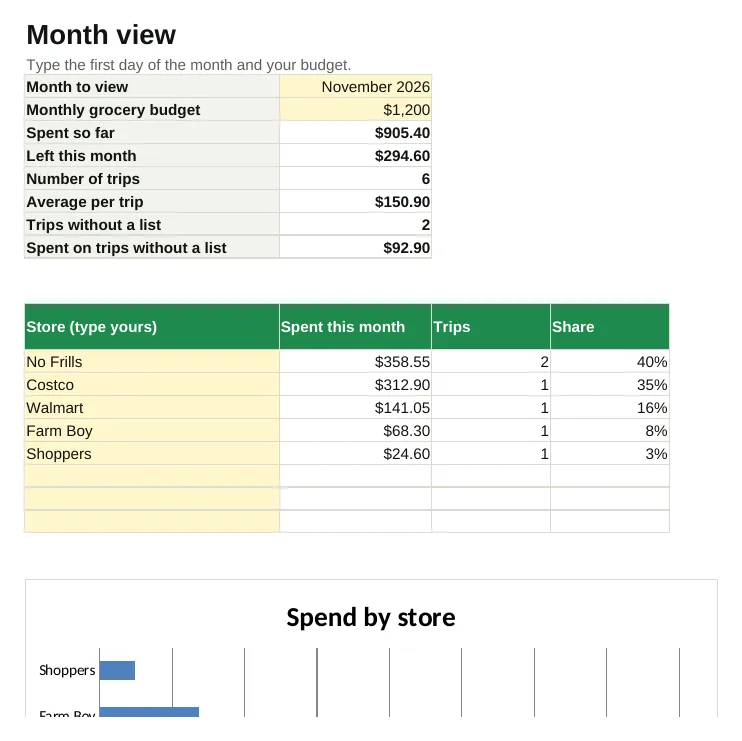
Month view
Type the first day of the month and your budget.
| Month to view | 2026-11-01 00:00:00 | ||
|---|---|---|---|
| Monthly grocery budget | 1200 | ||
| Spent so far | (calculates) | ||
| Left this month | (calculates) | ||
| Number of trips | (calculates) | ||
| Average per trip | (calculates) | ||
| Trips without a list | (calculates) | ||
| Spent on trips without a list | (calculates) | ||
| Store (type yours) | Spent this month | Trips | Share |
| No Frills | (calculates) | (calculates) | (calculates) |
| Costco | (calculates) | (calculates) | (calculates) |
| Walmart | (calculates) | (calculates) | (calculates) |
| Farm Boy | (calculates) | (calculates) | (calculates) |
| Shoppers | (calculates) | (calculates) | (calculates) |
| (calculates) | (calculates) | (calculates) | |
| (calculates) | (calculates) | (calculates) | |
| (calculates) | (calculates) | (calculates) |
Weekly
Type the Monday of the first week you want to track.
| Weekly target | (calculates) | ||
|---|---|---|---|
| Week starting | Spent | Target | Over or under |
| 2026-10-19 00:00:00 | (calculates) | (calculates) | (calculates) |
| (calculates) | (calculates) | (calculates) | (calculates) |
| (calculates) | (calculates) | (calculates) | (calculates) |
| (calculates) | (calculates) | (calculates) | (calculates) |
| (calculates) | (calculates) | (calculates) | (calculates) |
| (calculates) | (calculates) | (calculates) | (calculates) |
| (calculates) | (calculates) | (calculates) | (calculates) |
| (calculates) | (calculates) | (calculates) | (calculates) |
| (calculates) | (calculates) | (calculates) | (calculates) |
Item
| Milk, 2% | No Frills | 4 | L | 5.89 | (calculates) | 2026-11-08 00:00:00 | (calculates) | (calculates) |
|---|---|---|---|---|---|---|---|---|
| Milk, 2% | Costco | 4 | L | 5.49 | (calculates) | 2026-11-08 00:00:00 | (calculates) | (calculates) |
| Eggs, large | No Frills | 12 | each | 4.29 | (calculates) | 2026-11-08 00:00:00 | (calculates) | (calculates) |
| Eggs, large | Costco | 24 | each | 7.99 | (calculates) | 2026-11-08 00:00:00 | (calculates) | (calculates) |
| Chicken breast | Costco | 2.5 | kg | 32.5 | (calculates) | 2026-11-08 00:00:00 | (calculates) | (calculates) |
| Chicken breast | Walmart | 1 | kg | 15.4 | (calculates) | 2026-11-08 00:00:00 | (calculates) | (calculates) |
| Rice, basmati | Costco | 8 | kg | 19.99 | (calculates) | 2026-11-08 00:00:00 | (calculates) | (calculates) |
| Rice, basmati | No Frills | 4.5 | kg | 13.99 | (calculates) | 2026-11-08 00:00:00 | (calculates) | (calculates) |
| (calculates) | (calculates) | (calculates) | ||||||
| (calculates) | (calculates) | (calculates) | ||||||
| (calculates) | (calculates) | (calculates) | ||||||
| (calculates) | (calculates) | (calculates) | ||||||
| (calculates) | (calculates) | (calculates) | ||||||
| (calculates) | (calculates) | (calculates) | ||||||
| (calculates) | (calculates) | (calculates) | ||||||
| (calculates) | (calculates) | (calculates) |
Grocery tracker: your questions
Is the grocery tracker really free?
Yes. Leave your email and the full template opens on the page straight away, and stays open on this device. No card, no trial.
What do I need to open it?
Nothing. It opens on this page as sheets you can read; the shaded cells are the inputs and the rest calculates. Copy the structure into your own spreadsheet, or ask us to keep it filled in for you.
Will you email me afterwards?
You get the template, then a short series of practical emails for Canadian business owners. Unsubscribe in one click.
Can you set it up for my business?
Yes. That is what the monthly plans are for: we keep the numbers current so the template is filled in for you. Ask for a fixed price quote.
Rather have us keep the numbers?
Two questions, then where to reply. You hear from us within one working day with an indicative range and the plan that fits. The exact price is confirmed in writing before any work starts.
We never ask for confidential documents on this form. Secure upload happens after onboarding.
- WhatsAppMessage us from your phone
- Book a callPick a time that suits you
- Call +1 647 283 1515Office hours, Eastern time
- Emailsalman@accountingdoc.ca
We never ask for confidential documents in chat.
We use one analytics cookie to see which pages help people. Privacy