Free tool
Free receipt andexpense log.
Scan each receipt with the phone you already have, paste the link, and every medical, childcare, donation and work receipt is totalled and findable when your return is prepared.
- Price
- Free
- Format
- On this page, always current
- Built by
- Salman Feroz, CPA, CMA and team
- Code word
- RECEIPTS
What is inside
5 parts, one workbook
Inputs are marked in colour. Everything else calculates. The first sheet is a one-page guide.
- 01Receipts: one line each, with a link to the scanIncluded
- 02Your own category listIncluded
- 03Summary by category and by monthIncluded
- 04A "keep for taxes" total and an "ask us" countIncluded
- 05Phone scanning steps on the first pageIncluded
Who it is for
Receipt and expense log: who gets the most from it
Scan the receipt with your phone, add one line, and the shoebox is gone.
Built by The Accounting Doc team in Pickering, Ontario, from the working files we use with clients.
- Families gathering medical, childcare and donation receipts
- Employees and professionals with work expenses
- Side businesses and rental owners not yet on software
Get the receipt and expense log
Tell us who you are and the full template opens on this page, straight away and every time you come back. Free. We also send you the new tools as they come out.
- Receipts: one line each, with a link to the scan
- Your own category list
- Summary by category and by month
- A "keep for taxes" total and an "ask us" count
The template, on the page
View it here, copy the structure into your own sheet. The template stays on this page so it is always the current version; inputs are the shaded cells, everything else calculates.
Leave your email to open the full template
Free. The view opens straight away and stays open on this device.
Open the template| The Accounting Doc | ||
|---|---|---|
| Snap the receipt with your phone, add one line here, and the shoebox is gone. At tax time everything is in one place, totalled by category, with a link to every receipt. | ||
| How to use it | ||
| Step 1 | Make one folder in Google Drive, iCloud or OneDrive called Receipts, with the year in the name. | |
| Step 2 | When you get a receipt, scan it with your phone into that folder. Most phones scan a paper to PDF from the Drive, Files or Notes app. | |
| Step 3 | Add one line in Receipts: date, who you paid, category, amounts, and paste the link to the scan. | |
| Step 4 | Open Summary to see totals by category and by month. Send it to your accountant with the folder link. | |
| Colour key | ||
| Yellow cells | You type here. Sample entries are already in: type over them or delete them. | |
| White and grey cells | These calculate on their own. Leave them alone. | |
| What is in this workbook | ||
| Receipts | One line per receipt, with a link to the scan. Up to 500. | |
| Categories | Your list. Change it to suit your household or business. | |
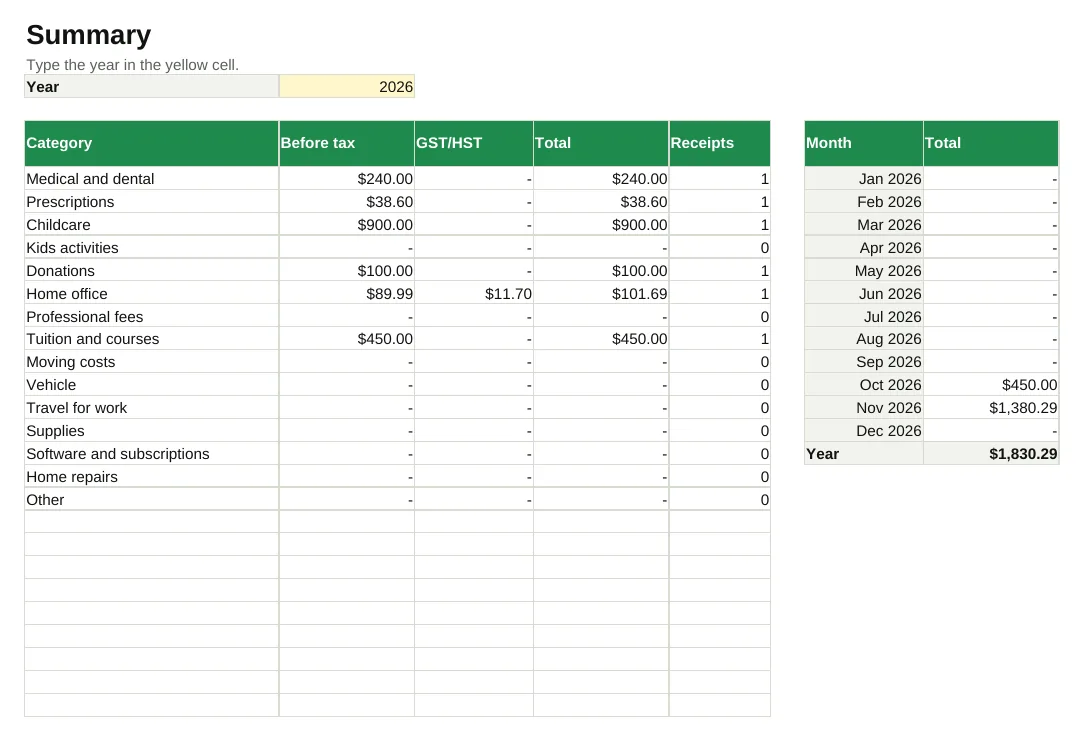
| Summary | Totals by category and by month for the year you choose. | |
| Good to know | ||
| The Canada Revenue Agency generally expects you to keep records and supporting documents for six years from the end of the tax year they relate to. A clear scan kept with this log makes that easy. | ||
| Which receipts matter for your tax return depends on your situation. Mark anything you are unsure about as Ask, and we will tell you. | ||
| Built by The Accounting Doc, Pickering, Ontario. accountingdoc.ca. A working tool, not tax, legal or financial advice. Want the numbers kept for you? Ask for a fixed price quote at accountingdoc.ca. |
Category (type your own)
Medical and dental
Prescriptions
Childcare
Kids activities
Donations
Home office
Professional fees
Tuition and courses
Moving costs
Vehicle
Travel for work
Supplies
Software and subscriptions
Home repairs
Other
| Category (type your own) |
|---|
Date
| 2026-11-02 00:00:00 | Pickering Dental | Medical and dental | Family | 240 | 0 | (calculates) | Credit card | Yes | (calculates) | |
|---|---|---|---|---|---|---|---|---|---|---|
| 2026-11-05 00:00:00 | Shoppers Drug Mart | Prescriptions | Family | 38.6 | 0 | (calculates) | Debit | Yes | (calculates) | |
| 2026-11-06 00:00:00 | Staples | Home office | Work | 89.99 | 11.7 | (calculates) | Credit card | Ask | (calculates) | |
| 2026-11-09 00:00:00 | Little Stars Daycare | Childcare | Family | 900 | 0 | (calculates) | E-transfer | Yes | (calculates) | |
| 2026-11-11 00:00:00 | SickKids Foundation | Donations | Family | 100 | 0 | (calculates) | Credit card | Yes | (calculates) | |
| 2026-10-20 00:00:00 | Durham College | Tuition and courses | Work | 450 | 0 | (calculates) | Credit card | Yes | (calculates) | |
| (calculates) | (calculates) | |||||||||
| (calculates) | (calculates) | |||||||||
| (calculates) | (calculates) | |||||||||
| (calculates) | (calculates) | |||||||||
| (calculates) | (calculates) | |||||||||
| (calculates) | (calculates) | |||||||||
| (calculates) | (calculates) | |||||||||
| (calculates) | (calculates) |
Summary
Type the year in the yellow cell.
| Year | 2026 | ||||||
|---|---|---|---|---|---|---|---|
| Category | Before tax | GST/HST | Total | Receipts | Month | Total | |
| (calculates) | (calculates) | (calculates) | (calculates) | (calculates) | Year | (calculates) | |
| Total | (calculates) | (calculates) | (calculates) | (calculates) | |||
| Marked "Keep for taxes" | (calculates) | ||||||
| Marked "Ask" (send these to us) | (calculates) | ||||||
| (calculates) | (calculates) | (calculates) | (calculates) | (calculates) | (calculates) | (calculates) | |
| (calculates) | (calculates) | (calculates) | (calculates) | (calculates) | (calculates) | (calculates) | |
| (calculates) | (calculates) | (calculates) | (calculates) | (calculates) | (calculates) | (calculates) | |
| (calculates) | (calculates) | (calculates) | (calculates) | (calculates) | (calculates) | (calculates) | |
| (calculates) | (calculates) | (calculates) | (calculates) | (calculates) | (calculates) | (calculates) | |
| (calculates) | (calculates) | (calculates) | (calculates) | (calculates) | (calculates) | (calculates) | |
| (calculates) | (calculates) | (calculates) | (calculates) | (calculates) | (calculates) | (calculates) | |
| (calculates) | (calculates) | (calculates) | (calculates) | (calculates) | (calculates) | (calculates) |
Receipt and expense log: your questions
Is the receipt and expense log really free?
Yes. Leave your email and the full template opens on the page straight away, and stays open on this device. No card, no trial.
What do I need to open it?
Nothing. It opens on this page as sheets you can read; the shaded cells are the inputs and the rest calculates. Copy the structure into your own spreadsheet, or ask us to keep it filled in for you.
Will you email me afterwards?
You get the template, then a short series of practical emails for Canadian business owners. Unsubscribe in one click.
Can you set it up for my business?
Yes. That is what the monthly plans are for: we keep the numbers current so the template is filled in for you. Ask for a fixed price quote.
Rather have us keep the numbers?
Two questions, then where to reply. You hear from us within one working day with an indicative range and the plan that fits. The exact price is confirmed in writing before any work starts.
We never ask for confidential documents on this form. Secure upload happens after onboarding.
- WhatsAppMessage us from your phone
- Book a callPick a time that suits you
- Call +1 647 283 1515Office hours, Eastern time
- Emailsalman@accountingdoc.ca
We never ask for confidential documents in chat.
We use one analytics cookie to see which pages help people. Privacy